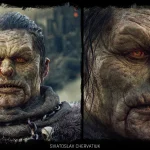



Not every game asset needs the same level of detail. A character, prop, weapon, or environment piece may look impressive in a close-up render, but if players mostly see it from a distant gameplay camera, many small details will have little value in the actual game.
The opposite can also happen: an asset may be built too simply for gameplay and later appear in an inventory, dialogue, character selection screen, marketing image, or close-up scene.
In both cases, the asset was created without a clear understanding of how players would actually see it. This is where the Game Art Budget can be wasted.
The common production mistake
A common mistake is starting production without defining how the asset will actually be used. Without a clear target, one artist may build for close-ups, another for distant gameplay, while another adds details that look good in the viewport but remain invisible from the game camera.
This creates inconsistent assets and wastes production time. The team either pays for details players never notice or has to rebuild the asset later because it cannot support close-up use. Both problems come from defining the production target too late.

Why camera distance changes the asset
Camera distance changes which details matter. A small buckle, fabric seam, surface scratch, or ornament may add value in a close-up but disappear or become visual noise when viewed from a distant gameplay camera.
Before production begins, the team should define where the asset will appear:
- distant or medium gameplay camera;
- close-up view;
- inventory or UI preview;
- character selection screen;
- dialogue scene;
- cinematic shot;
- marketing render.
Each use case requires a different level of detail. Gameplay assets need readability, close-up assets need polish, and marketing assets may require additional presentation quality. These should not be treated as the same production task.
What should be checked before production
Before spending time on detail, the team should confirm how the asset will be used:
What is the actual camera distance?
How large will the asset appear on screen?
Where will the player focus during gameplay?
Will the asset appear in UI, inventory, dialogue, or cinematics?
Does it need a marketing render?
What are the platform and performance limits?
Which details improve silhouette and material readability?
Is one version enough, or are separate versions needed?
Which details create visible value, and which add hidden cost?
The goal is not to make the asset less attractive. It is to focus production effort on the parts players will actually see.
Where detail is worth the budget
Detail is worth the budget when it improves the player-facing result.
For example:
- a hero character shown in dialogue may need stronger face, hair, and material polish
- a weapon shown in inventory may need better close-up texture work
- a main enemy seen often in combat may need a clear silhouette and readable forms
- an environment prop near the player path may need better material detail
- a marketing asset may need extra polish that is not required for gameplay
But background assets, distant props, small accessories, or fast-moving gameplay elements may not need the same amount of micro-detail.
In those cases, silhouette, color, material grouping, and readability may matter more than tiny surface details.
When one asset version is not enough
What VSQUAD does
Before or during production, VSQUAD can help define the right level of detail for each asset. This can include:
- checking the asset against the gameplay camera;
- identifying which details are worth keeping;
- simplifying elements that will not be visible;
- improving silhouette and readability;
- separating gameplay and close-up requirements;
- recommending a second version when one asset cannot support both views;
- matching production effort to the real use case;
- checking whether the detail level fits the budget and platform.
The best solution may be one balanced version or separate gameplay and close-up assets. In other cases, reducing micro-detail and investing more in silhouette, color, materials, animation support, or engine readability creates greater value.
Why this protects the budget
Detail is not free. It adds time across modeling, sculpting, texturing, material setup, optimization, reviews, and rework. It can also affect performance.
If players cannot see that detail, the production time is wasted. If the required detail was not planned, the team may have to rebuild the asset later. Both outcomes increase costs.
For indie teams, every production hour matters. For larger teams, matching detail to use case helps maintain consistent quality across characters, environments, props, UI previews, and marketing assets.

The result
Get in touch
Got a project in mind? We usually reply within a day.